Choosing a cPanel alternative in 2026: what to look for
A practical guide to comparing hosting control panels in 2026: security architecture, account isolation, per-account vs per-server pricing, migration and billing.
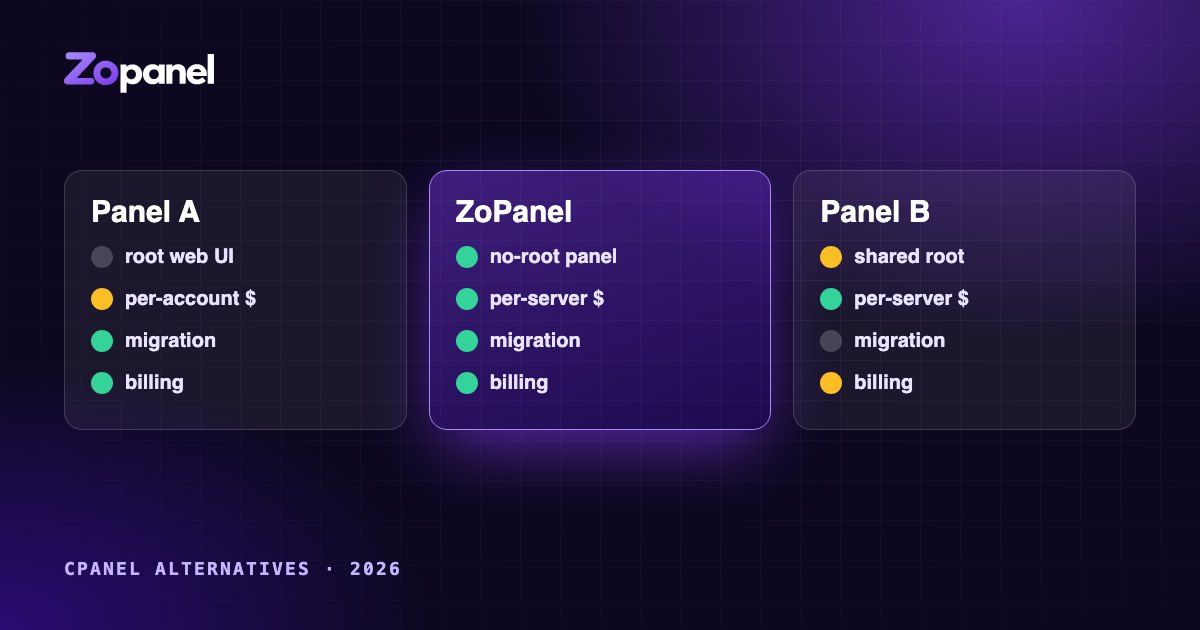
Key takeaways
- Start from what you sell: shared hosting, reseller, WordPress or managed VPS.
- Check who runs as root and how customers are isolated before comparing features.
- Per-account pricing grows with every customer; per-server pricing does not.
- Test migration, billing automation and recovery on a real server before deciding.
For many hosting companies, cPanel was never a decision; it was simply what hosting ran on. That changed when licensing moved to pricing by the number of accounts, and every year since, more providers have asked whether their panel still fits their business. In 2026 the choice of a cPanel alternative is wider than it used to be, which also makes it harder.
This guide is about how to choose, not about who wins. We make ZoPanel, so we have an obvious interest; we have tried to make the criteria useful whichever panel you end up with, and to describe the alternatives fairly. Prices and features change often, so check every vendor's current pricing and documentation before you decide, including ours.
Start with what you actually sell
The right panel depends on your business:
- Shared and reseller hosting with hundreds of small accounts per server needs strong isolation between customers, reseller controls and billing automation above all.
- VPS with a panel sold one customer per server needs low cost per server, quick unattended installation and light resource use.
- Agencies hosting their own clients' sites care about WordPress tooling, staging, backups and how easy it is to hand a site over.
Write down the five things you do most often, then judge each panel by how well it does those, not by the length of its feature list.
1. Security architecture: who runs as root?
A control panel has the keys to everything on the server. The most important question is what an attacker gets if the panel itself has a flaw, because every large codebase eventually has one.
Ask each vendor:
- Which processes run as root? If the web interface that parses every request runs as root, a single bug in it can mean full control of the server and every customer on it.
- How are privileged actions requested? Is there a narrow, defined interface between the web interface and the code that needs root, or can the interface run arbitrary commands?
- Are inputs checked again on the privileged side? Or does the privileged code trust what the web layer sends?
- How are updates verified? Signed releases, verified before installation, with rollback when an update fails?
ZoPanel's answer is privilege separation: the web panel runs as an unprivileged user, and a separate root agent accepts only a fixed list of actions and re-checks every parameter. We explain the reasoning in Why a hosting control panel should never run as root. Whatever you choose, ask the question and get a specific answer.
2. Isolation between customers
On shared hosting, your customers' main risk is each other: one compromised WordPress site should not be able to read another customer's files, database passwords or mail, or take all the server's memory.
Look for:
- File isolation: each account under its own system user, with home directories other accounts cannot read, and protection against symlink tricks.
- Process isolation: customers cannot see or signal each other's processes.
- Resource limits: CPU, memory, processes and disk I/O per account, so one site cannot starve the rest.
- Isolation for everything, not just PHP: Node.js and Python apps, cron jobs, Docker containers, databases and Redis.
With cPanel and DirectAdmin, per-account resource limits are usually provided by CloudLinux, a separate paid product that many providers already use and trust. ZoPanel builds isolation in: every account runs in its own systemd sandbox with its own limits, and Docker apps run in user namespaces. Both approaches can work; the point is to include the cost and the operational complexity of isolation in your comparison.
3. Pricing: per account or per server?
This is the question that sends most people looking (see cPanel's current pricing for the per-account model).
Per-account pricing ties the license cost to the number of accounts on a server. It suits a provider with a few accounts per server, and it is predictable when accounts change slowly. It grows with your business, which is exactly the problem on dense shared hosting.
Per-server pricing charges the same for a server whatever it holds. Density then lowers your cost per customer, instead of raising it.
When you compare, model your real numbers:
- How many accounts do you run per server today, and in two years?
- What do the add-ons you need cost (isolation, backups, security, WordPress tools)?
- Is there a lifetime option, and what does it include over time?
- Is there a free tier you can use for small servers or testing?
For reference, ZoPanel is priced per server. The Free plan runs 10 websites and 10 databases on one server with every hosting feature. Paid plans (currently $49 a year, or $199 once for a lifetime license) remove the limits and add reseller accounts, the billing integrations and provisioning API, encrypted S3 backups and multiple PHP versions. When a yearly license ends, the panel returns to Free limits and nothing is deleted.
4. Migration: how do your customers get across?
A panel you cannot migrate to is a panel you will not switch to. Ask:
- Can it import backups from your current panel directly, account by account?
- What comes across: websites, databases, mailboxes and their mail, DNS zones, FTP accounts, SSL certificates, cron jobs?
- Do customers keep their passwords, or do you have to send hundreds of reset e-mails?
- Can you migrate in batches, and test each account before switching DNS?
ZoPanel imports cPanel and DirectAdmin backups with websites, databases, mailboxes, DNS zones, FTP accounts and certificates, and customers keep their existing passwords. Whatever you choose, migrate a few real accounts on a test server before committing; that is where surprises appear.
5. Billing integration and automation
If you sell hosting, the panel lives behind your billing system. Check:
- Ready modules for the billing system you use (WHMCS, Blesta, HostBill, Paymenter or others), and who maintains them.
- The lifecycle: create, suspend, unsuspend, change package, terminate, single sign-on from the client area, usage reporting.
- Safe retries: billing systems retry after timeouts. Does the API guarantee that a retried "create" does not create two accounts? ZoPanel's provisioning API uses idempotency keys for this.
- Reseller limits: a reseller must not be able to give their customers more than their own plan allows.
- Events: signed webhooks or hooks for your own automation.
cPanel, DirectAdmin and Plesk all have long-standing integrations with the major billing systems. ZoPanel includes modules for WHMCS, Blesta, HostBill and Paymenter, all built on the same documented provisioning API. See the developer hub.
6. Operations: the part you live with every day
Features attract you to a panel; operations decide whether you stay. Look at:
- Updates: signed, tested, and rolled back automatically if the new version is unhealthy?
- Backups: incremental, encrypted before they leave the server, verified, restorable to a new server?
- Behaviour under load: what happens when a site gets ten times its normal traffic? Does the server recover by itself?
- Monitoring and alerts: service restarts, blocklisted IPs, full disks, expiring certificates.
- Recovery: if the panel's own database is damaged, or the server is lost, how do you get back?
7. Platform and ecosystem
- Operating systems: which distributions are supported, and for how long? Do you need Windows hosting?
- Ecosystem: plugins, documentation, how many administrators already know it, community answers when you are stuck at 2 a.m.
- Vendor: how often do releases ship, how are security issues handled, and is there a published security policy?
The main options, briefly
cPanel & WHM. The most widely used panel in shared hosting, with a very large ecosystem, deep third-party support, and many administrators and customers who already know it. Its pricing is per account, which works well for low-density servers and less well for dense shared hosting. Per-account isolation is typically added with CloudLinux.
DirectAdmin. Lighter and simpler than cPanel, with a loyal following and a reputation for modest resource use. Its licenses come in tiers; compare them with your account counts. It supports a wide range of Linux distributions and has solid billing integrations. Like cPanel, isolation is usually provided by CloudLinux.
Plesk. Strong for agencies and WordPress, with a polished interface and an extension catalogue, and the only one of these that also runs on Windows Server. It is sold in editions that differ mainly by how many domains they include; check the current editions against your needs.
ZoPanel. A newer panel, licensed per server, built around privilege separation and built-in isolation, with Docker apps, S3 backups and billing modules included. It runs on Ubuntu (22.04, 24.04) and Debian (12, 13) only, on a fresh server, and has a younger ecosystem than the established panels. You can judge its density yourself from our published capacity measurements.
How to evaluate in practice
- Shortlist two or three panels against the criteria above that matter most to your business.
- Install each on a test VPS the same size as your production servers. Use free tiers or trials.
- Migrate five real accounts: a WordPress site, a shop, a mail-heavy customer, a reseller, and your most awkward customer.
- Run your billing system against it: create, suspend, upgrade, terminate, retry after a timeout.
- Break it on purpose: overload a site, stop a service, restore a backup to a new server.
- Do the five-year cost model with your real account counts and the add-ons you would need.
The best panel is the one that makes your most frequent tasks safe and boring, at a cost that improves as you grow.
Frequently asked questions
What is the best cPanel alternative in 2026?
It depends on what you sell. Compare security architecture, account isolation, pricing model, migration tools and billing integration, and test the shortlist on a real server with your own sites.
Is per-server pricing cheaper than per-account pricing?
For most hosting companies with more than a few dozen accounts per server, yes: per-server pricing stays flat as you add customers, while per-account pricing grows with each one. Model five years with your real numbers.
Can I migrate from cPanel without downtime?
Usually yes. Import accounts from cPanel backups, check the sites on the new server, then switch DNS. Lowering DNS TTL a day before keeps the change short.
Install ZoPanel free
One command on a fresh Ubuntu or Debian server. Up and running in minutes.
Install in 5 minutesKeep reading
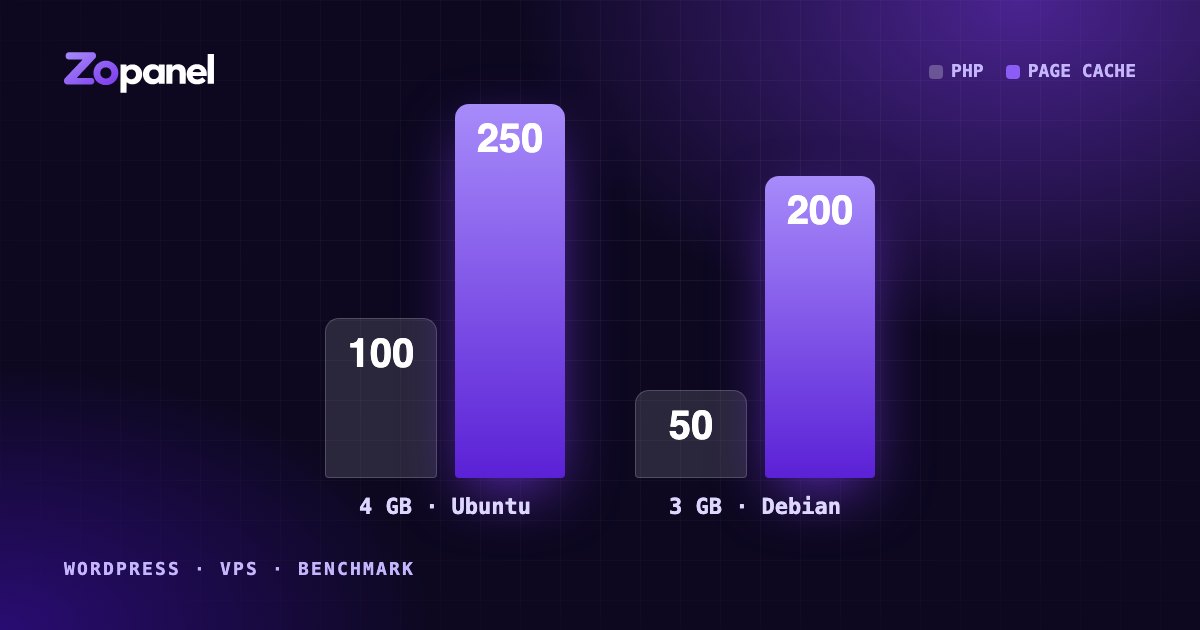
How many WordPress sites can a 4 GB VPS host? Our measurements
We loaded real WordPress sites and apps onto 4 GB and 3 GB VPS servers until they broke. Here is what fit, why page cache matters most, and how to plan.
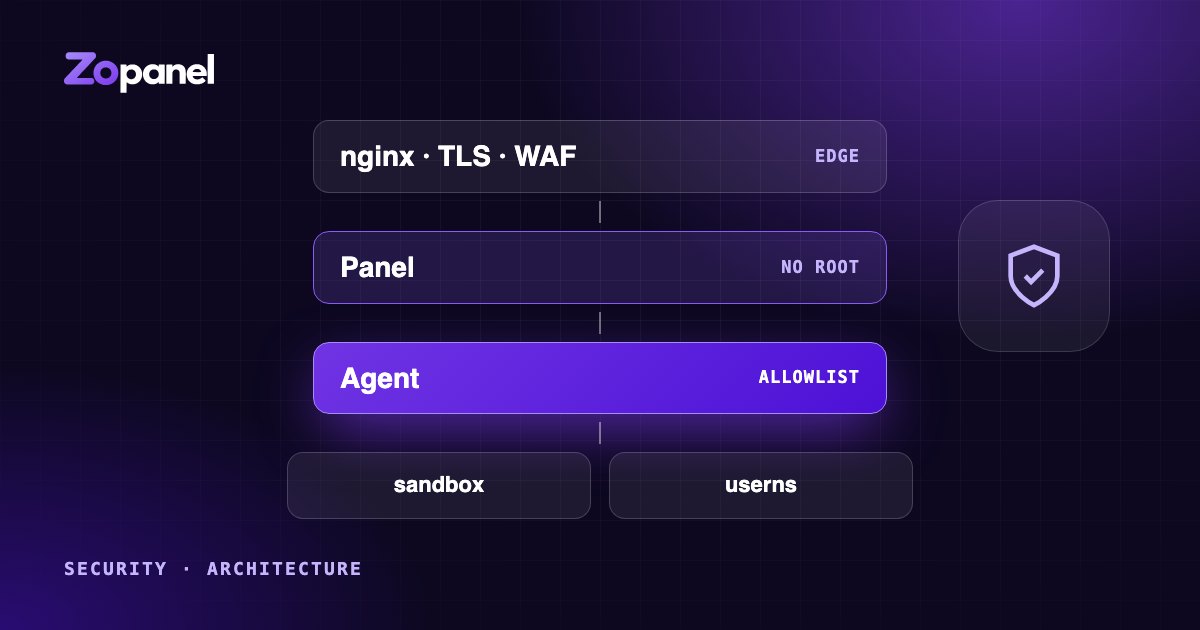
Why a hosting control panel should never run as root
Privilege separation, per-account sandboxes, user namespaces for Docker and defense in depth: how to design a hosting panel so one bug does not hand over the server.